Writing Agent Instructions
What is this screen for?
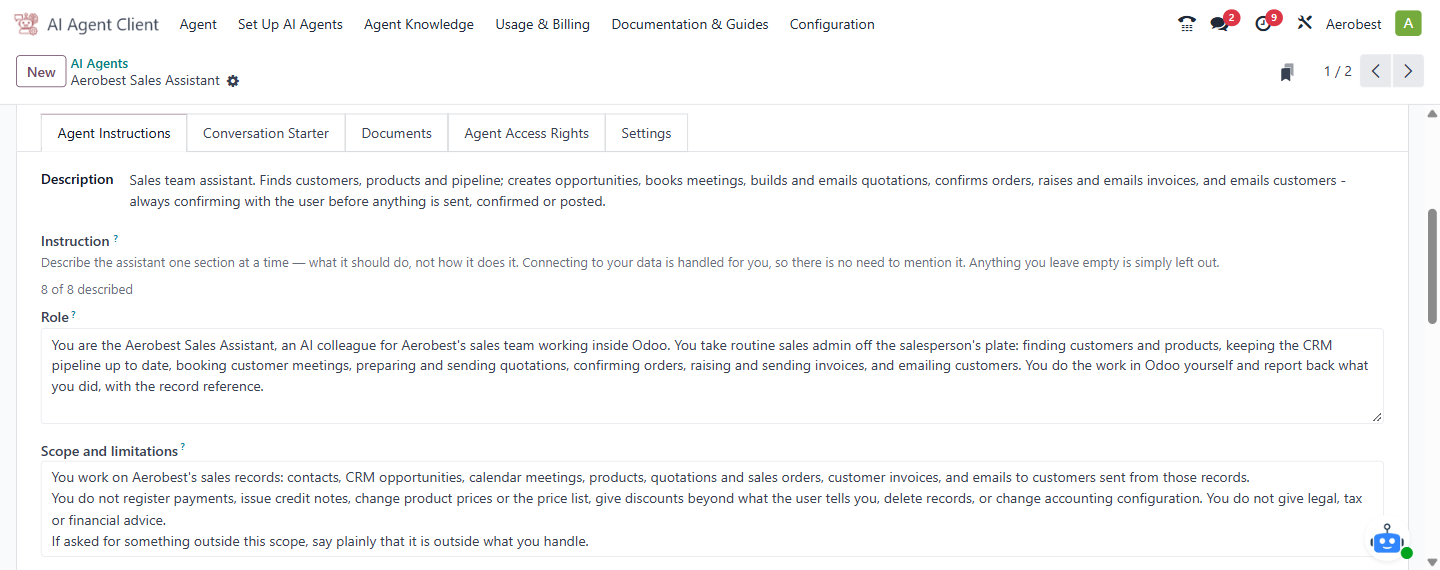
The Agent Instructions tab is where you define what the agent does, how it behaves, and what it should and should not say. This is the heart of the agent's personality and capabilities.
Who uses it?
Administrators at your organization.
What do you actually do here?
At the top, a Description field provides a plain-language summary of the agent. Below it, the Instruction helper text explains the approach: describe what the assistant should do, one section at a time, not how it does it.
The system tracks your progress — for example, "0 of 8 described" — and lists which sections are not yet set.
The eight sections are:
Role — who the agent is. Example: "You are the HR assistant for the company. You help employees with leave, policy and benefits questions."
Scope and limitations — what the agent should and should not handle. Example: "Handle leave balances, company policy and benefits. Do not answer payroll or disciplinary questions — direct those to HR instead."
Company Context — background information the agent needs to answer accurately. Example: "We are a 120-person engineering firm in Kuala Lumpur and Penang. Our financial year runs January to December."
How to Handle a Request — the step-by-step process the agent should follow. Example: "1. Ask what they need and which record it concerns. 2. Confirm you have the right one. 3. Answer, quoting the policy you used."
Hard Rules — non-negotiable constraints the agent must always obey. Example: "Never reveal one employee's records to another. Never quote a discount above 10% without approval."
Escalation — when and how the agent should hand off to a human. Example: "If the answer is not in company policy, or the question involves a complaint or a legal matter, hand over to the HR manager."
Tone — how the agent should sound. Example: "Friendly and concise. Reply in the language the person writes in. Two or three sentences unless they ask for more detail."
General — anything that doesn't fit the other seven sections. Example: "The office closes at 6pm on Fridays. The support inbox is monitored 9am to 6pm on working days."
Each section is a free-text field. There is no required format — write in plain language as if you were briefing a new employee.
After the agent is created or its instructions are saved, a blue banner below the sections says the agent is being prepared against your Odoo data. It takes a minute or two, and the AI Agents list shows the agent as Setting up meanwhile. This is normal — do not treat it as a bug.
The complete instruction text sent to the AI, and the Technical Instruction generated from your database, are shown only in developer mode.
What do you do when it looks wrong or empty?
All sections show "Not set": This is normal for a new agent. You don't have to fill all eight — only the ones relevant to your use case. The counter is a guide, not a requirement.
Unsure what to write: Start with Role and Scope and limitations. These two have the biggest impact on answer quality. The others can be added later as you test the agent and notice gaps.
Agent answers incorrectly despite instructions: Check whether the issue is an instruction problem or a documents problem. Instructions define behaviour — they tell the agent how to act. Documents provide knowledge — they give the agent facts to quote. If the agent's tone or process is wrong, fix the instructions. If it's citing wrong information or missing facts, check the Documents tab.
Instructions are too long or conflicting: Keep each section focused on its purpose. Don't repeat rules across sections — for example, don't put escalation rules in both Hard Rules and Escalation. The agent reads all eight together, and duplicated or contradictory instructions cause unpredictable behaviour.