The Audit Log
1. What is this screen for?
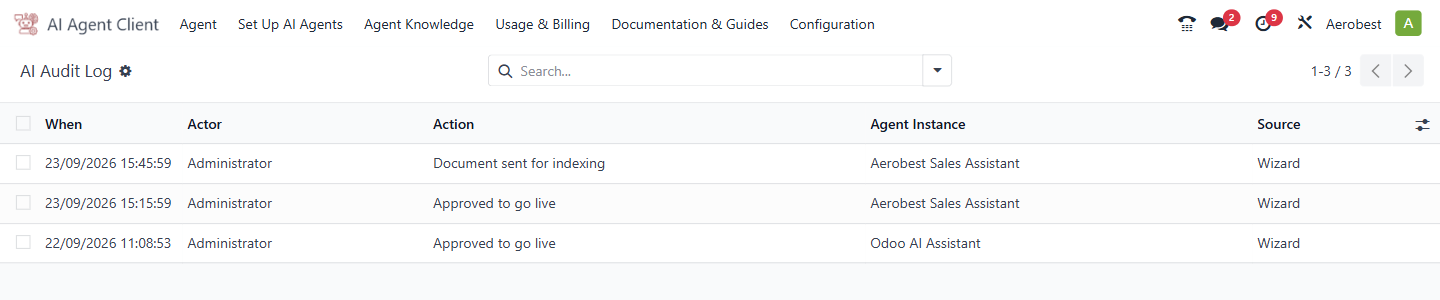
The AI Audit Log records who did what to which agent, and when. It is the accountability trail for agent setup and changes.
2. Who uses it?
Administrators at your organization.
3. What do you actually do here?
The log is a read-only table with these columns:
When — when the action happened.
Actor — who performed the action.
Action — what was done (e.g., "Agent created," "Approved to go live").
Agent Instance — which agent was affected.
Source — Wizard for approvals and agent creation (including Approve & Go Live on the agent form), Manual for a revoked approval, and Template Update for instructions refreshed from a template.
To narrow the list, use Filters → Add Custom Filter, or group by Actor or Agent Instance.
This screen is read-only. You come here to answer questions like: who approved this agent? When was it created?
4. What do you do when it looks wrong or empty?
Log is empty: No agent-level actions have been recorded yet. Entries are written when an agent is approved or its approval revoked, when an agent is created through setup or approval, when a template update rewrites its instructions, and when a document is sent for indexing. An agent made with New first appears here when it is approved. This is normal for a fresh installation before any agents have been set up.
You expect an entry but can't find it: Check whether a search filter is active. Clear all filters, then group by Agent Instance or Actor to find it.