Agent Images
The Settings tab
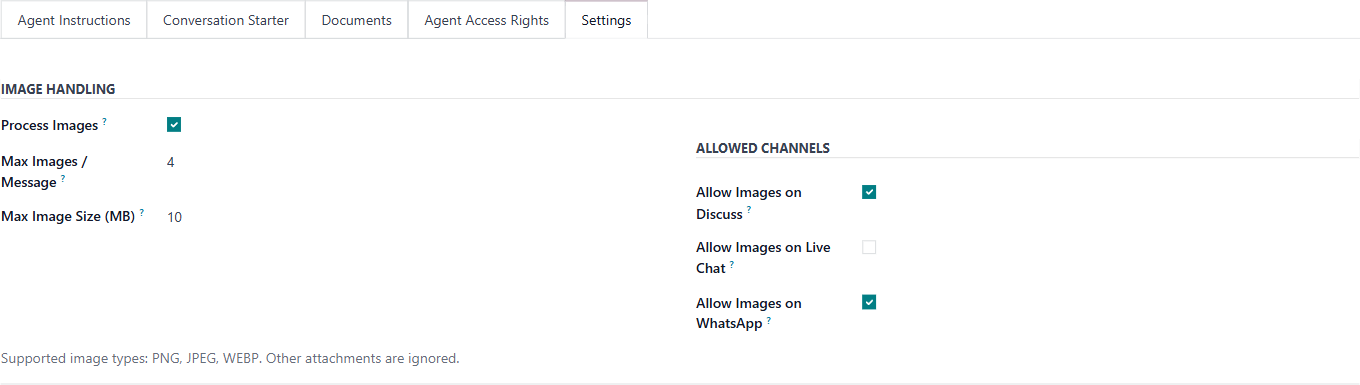
1. What is this screen for?
The Settings tab controls how the agent handles images — whether it can process them, what the limits are, and which communication channels allow image attachments.
2. Who uses it?
Administrators at your organization.
3. What do you actually do here?
This tab has two sections:
IMAGE HANDLING
Process Images — tick to allow the agent to analyse images that users attach to their messages. Untick to ignore all image attachments.
Max Images / Message — the maximum number of images the agent will process per single message. Default is 4.
Max Image Size (MB) — the maximum file size per image. Default is 10 MB. Images exceeding this limit are not processed.
Supported image types are PNG, JPEG, and WEBP. Other attachment types are not processed.
ALLOWED CHANNELS
These checkboxes control which communication channels allow users to send images to the agent:
Allow Images on Discuss — Odoo's internal messaging. Ticked by default.
Allow Images on Live Chat — the website live chat widget. Unticked by default.
Allow Images on WhatsApp — the WhatsApp integration. Ticked by default.
If Process Images is unticked at the top, these channel settings have no effect — images are not processed on any channel.
4. What do you do when it looks wrong or empty?
Users send images but the agent ignores them: Check that Process Images is ticked, that the image is under the size limit, that the file type is PNG, JPEG, or WEBP, and that the channel they're using has images allowed.
Agent processes images on a channel where you don't want it to: Untick the relevant channel checkbox under Allowed Channels.
All settings look correct but images still fail: The image may exceed Max Images / Message (the user sent more than 4 in one message) or the file may be a format other than PNG, JPEG, or WEBP — PDFs and documents are not processed as images.
When an image is skipped, the agent is told. A note is added to what the agent receives — for example, "[2 additional image(s) were attached but not processed…]" — so it can tell the user. The note itself is not shown in the chat. A similar note is added when images are switched off for that channel.