Set It Up
Install & Connect
What is this screen for?
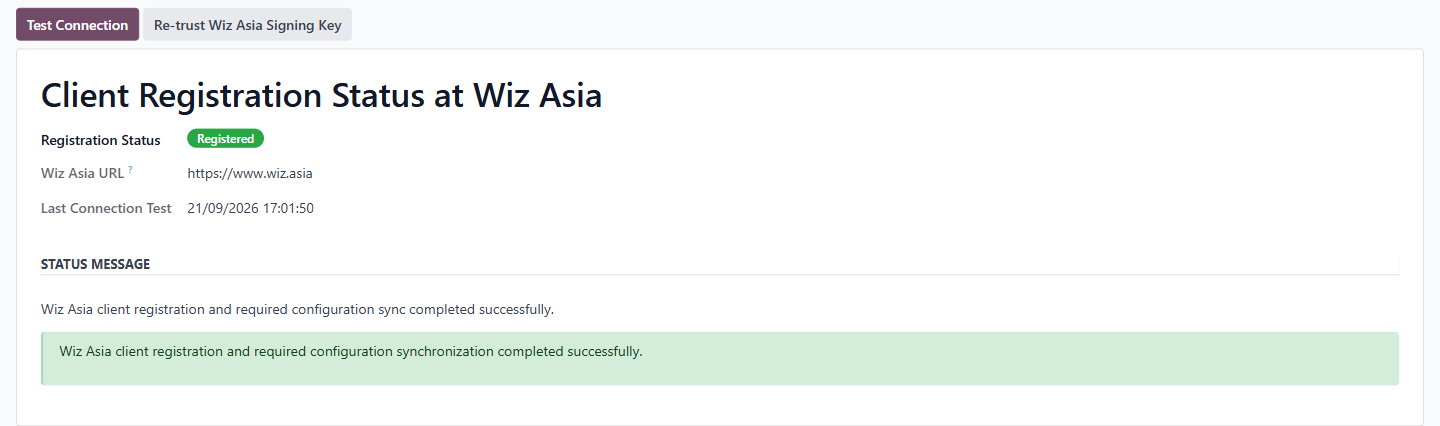
This screen shows whether your Odoo database is registered with the Wiz Asia AI service and whether the connection is working. It is the place to check when your agents cannot reach the AI service at all.
Who uses it?
Administrators at your organization.
What do you actually do here?
The screen shows three pieces of information:
Registration Status — a badge showing whether your database is registered with Wiz Asia. A green Registered badge means registration is complete.
Wiz Asia URL — the address this database uses to reach the Wiz Asia AI service. It is read-only here. If your own database's web address changes, contact help@wiz.asia so the registration can be updated.
Last Connection Test — when the automatic registration last recorded its status; on a registered database, when registration finished. Test Connection does not change it.
Below these fields, the Status Message section shows the automatic registration's latest message. The green banner means registration and the required configuration sync finished.
There are two action buttons at the top:
Test Connection — checks that your database can reach the AI service and is recognised; the result appears in a pop-up. Use it when you suspect a connectivity issue. A single agent that shows "Not connected yet" is retried from its own form, with Retry Connection.
Re-trust Wiz Asia Signing Key — refreshes the cryptographic keys your database uses to confirm that an answer genuinely came from Wiz Asia. You only need this if those keys are rotated and answers stop appearing. This is rare, and the button is safe to press. It is shown only to users with Odoo's Settings access, and asks you to confirm first.
What do you do when it looks wrong or empty?
Registration Status does not show "Registered": Registration runs automatically shortly after installation — there is no Register button on this screen. If Registration Status never reaches "Registered," contact help@wiz.asia.
Test Connection fails: Check that your Odoo instance has outbound internet access. If your server is behind a firewall or proxy, the connection to the Wiz Asia service may be blocked. If the problem persists, contact help@wiz.asia with the text of the pop-up that Test Connection shows.
Last Connection Test shows an old date: It records when registration last reported, not when someone last tested, so an old date does not mean the connection is broken. Click Test Connection to check it now.
Status Message shows an error you don't understand: Copy the full message and send it to help@wiz.asia. Do not attempt to change the Wiz Asia URL or other settings without guidance from your service provider.