Wallet & Plan
1. What is this screen for?
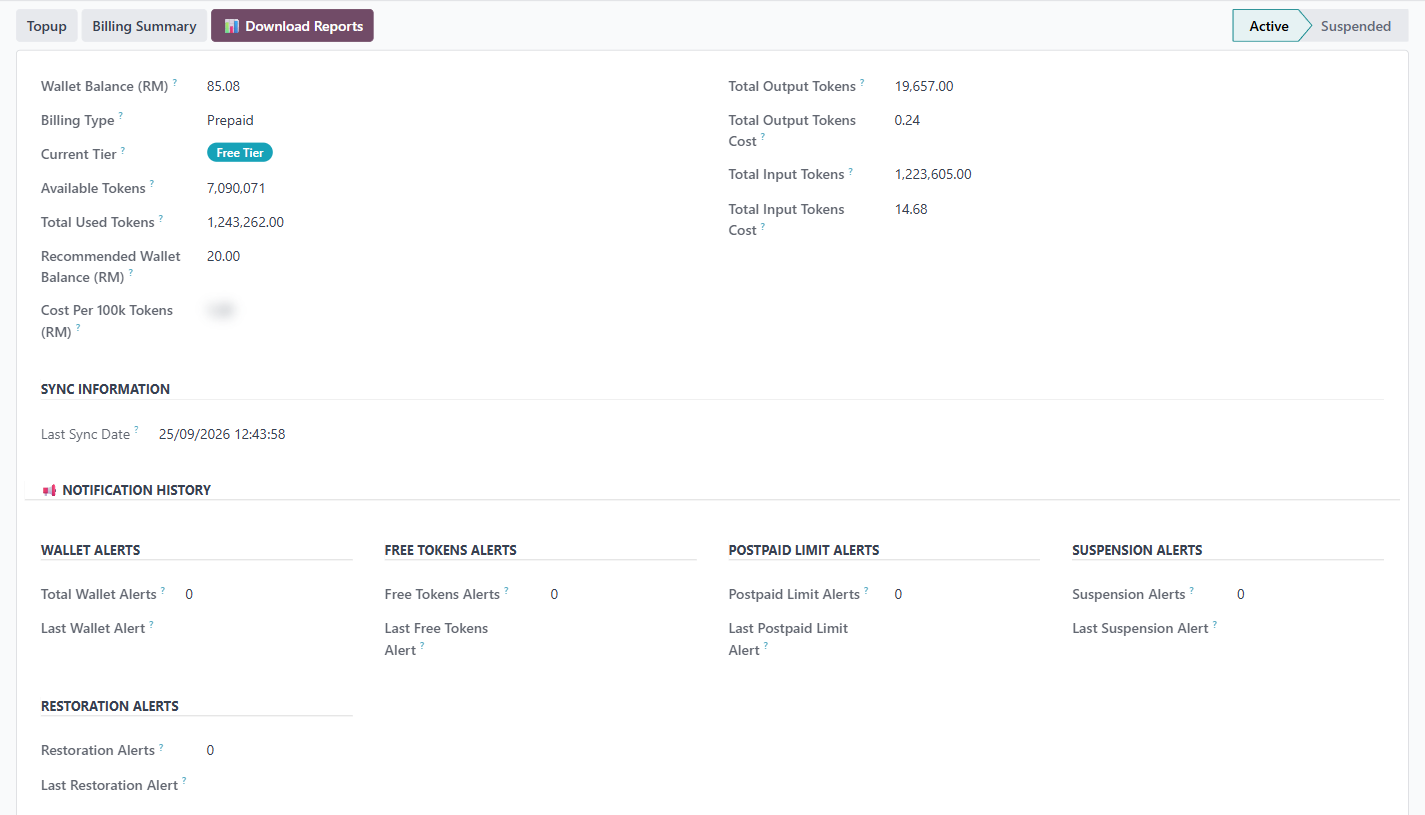
The Wallet & Plan screen shows your current token balance, pricing tier, and billing details. It is the single place to check how much usage capacity you have left.
2. Who uses it?
Administrators at your organization.
3. What do you actually do here?
The top of the screen shows your billing summary:
Wallet Balance (RM) — your current balance in Malaysian Ringgit.
Billing Type — Prepaid or Postpaid.
Current Tier — which pricing band you are on (e.g., "Free Tier").
Available Tokens — how many tokens you have remaining.
Total Used Tokens — how many tokens have been consumed to date.
Recommended Wallet Balance (RM) — the minimum balance Wiz Asia recommends maintaining.
Cost Per 100k Tokens (RM) — the rate per 100,000 tokens in your current tier.
The right side shows token usage breakdown:
• Total Output Tokens and their cost.
• Total Input Tokens and their cost.
Below the summary:
Sync Information — when the billing data was last synced with Wiz Asia.
Notification History — alert counters for wallet balance, free token usage, postpaid limits, suspension, and restoration events.
The status pipeline shows Active or Suspended. Three buttons are available:
Topup — opens the Wiz Asia website in a new tab, where you add tokens to your wallet.
Billing Summary — opens your billing on the Wiz Asia website.
Download Reports — downloads a Token Usage Statement or a Wallet & Deposit Statement (PDF or CSV), or a Comprehensive Report (PDF), for the dates you choose.
4. What do you do when it looks wrong or empty?
Wallet Balance is at or near zero: Click Topup to add tokens, or contact Wiz Asia if you are on an invoiced plan. Both the AI Agent and the Odoo Helper stop working when the available tokens run out, or when the balance falls to the Low Wallet Balance Block amount shown under Configuration → Plan & Pricing (for a postpaid plan, when it reaches the credit limit).
Status shows "Suspended": Your account has been suspended, likely due to an empty wallet or a billing issue. Top up your wallet or contact help@wiz.asia to resolve.
Data looks stale: Check the Last Sync Date under Sync Information. If it is old, the billing data may not reflect recent usage. Contact help@wiz.asia if syncing appears stuck.